ManageCourt Take the tour Start free trial
07:00Welcome

Court booking plugin for WordPress

Online court booking on your club's own website.

Players book tennis, padel, badminton and pickleball courts on your site, day or night. Your staff run the day from one calendar. And every booking is yours: no commission, no fee per court.

No card needed. Set it up on your own site and see it working before you buy.

Works with your WordPress themeAny WooCommerce payment gatewayMultilingual with WPML and Polylang
Court 2 · 18:00–19:00 · Bookedriversideclub.cy
07:30Made for
Owners and managers
Fill courts and get paid

See what's busy, what's empty and what's still owed.

Front-desk staff
One calendar for the day

Bookings, payments and check-ins in one place.

Web agencies
Booking for club sites

A court booking system to build into the sites you make.

Not for
Haircuts and dentists

ManageCourt is made for courts, and only courts.

08:00Sound familiar?

Sound familiar?

Court booking shouldn't take over your club.

Most clubs juggle phone calls, messages, a shared sheet and an app that takes a cut. ManageCourt puts all of it in one place, on the website you already have.

Read it like your calendar: grey is blocked, white is booked.

BeforeBlocked
“Can I have court 2 at seven?” Phone, WhatsApp, Instagram, all evening.
With ManageCourtBooked

Players book themselves, any time, and see only the times that are actually free.

BeforeBlocked
Double bookings, no-shows, and money still to collect at the desk.
With ManageCourtBooked

Courts can't be double-booked, players can pay online when they book, and Today shows what's still owed.

BeforeBlocked
A platform that keeps a share of every booking, and your players inside its app.
With ManageCourtBooked

Bookings stay on your site, payments go to your own account, your player list stays on your server.

09:00How it works

How it works

Up and running in an afternoon.

ManageCourt is a WordPress plugin. If your club has a WordPress site, you have everything you need.

Three steps, start to finish.

Step 110 min
Install and activate

Upload the plugin and start your free trial or enter your licence key. No card for the trial.

Step 2
Add your courts

Add a location with its opening hours and booking rules, then your courts with their sport and surface.

Step 3Live
Put booking on a page

Add the Court Booking block to any page. Each location also gets its own page with its details and booking.

09:30Features

Features

Everything a court club needs. Nothing it doesn't.

Built for courts from day one: locations and courts, partners and guests, member prices, regulars and rain. Here is what each part does for you.

10:00Booking page

For players · Booking page

A booking page players actually finish.

Before

Players give up when they have to call, wait for a reply, or scroll through a grid full of taken slots.

ManageCourt shows them a clear path: the location with its photo, address and amenities, then a court, then a time. They can choose Any court or the one they like: each court card shows its surface and how many free times it has. Only free times appear, grouped into morning, afternoon and evening. With Any court, once they pick a time they choose from the courts free at that moment.

  • 01Sport tabs and game lengths (for example 60 or 90 minutes)
  • 02Add partners by name: members, your club list or guests
  • 03Price and cancellation terms shown before confirming
  • 04My bookings to cancel, plus calendar files for their phone
  • 05Uses your theme's fonts and colours automatically
  • 06As a block, a shortcode, or each location's own page
Outcome

Bookings come in at eleven at night, when your desk is closed, and nobody has to ask what's free.

Choose a courtriversideclub.cy
Who's playingWed 21
10:30Regular bookings

For players and staff · Regular bookings

Set the Tuesday regulars once, for the whole season.

Before

Weekly games, leagues, coaching and school groups book the same court every week, and someone types them in every week.

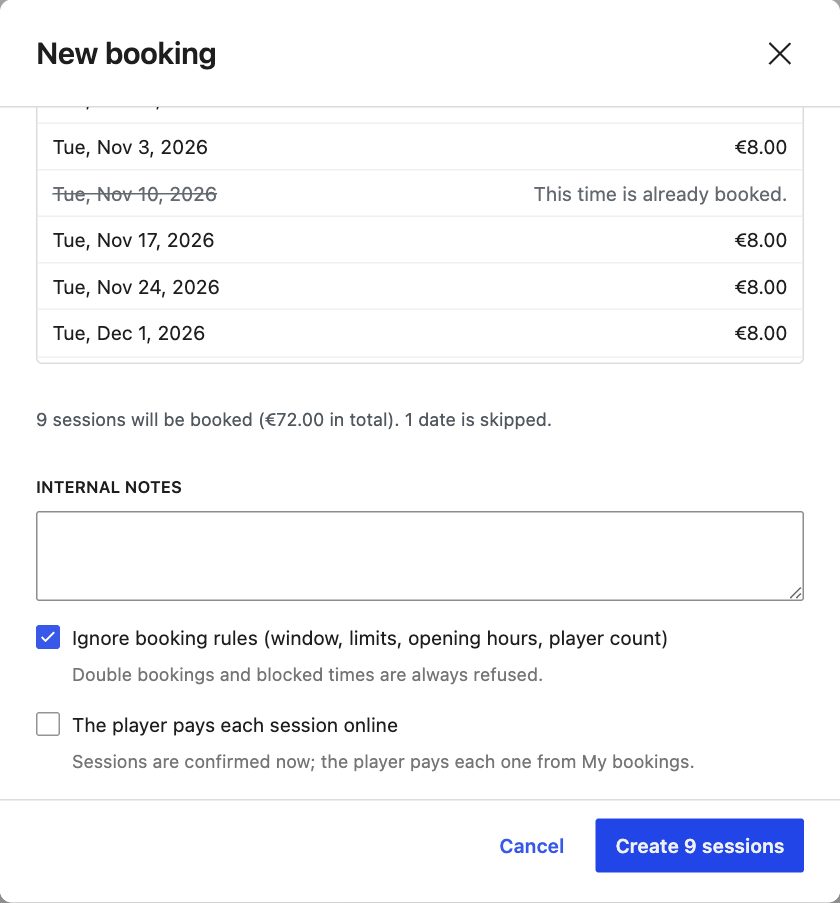
A regular booking takes the same court, time, length and players every week, or every 2, 3 or 4 weeks, for a number of sessions or until a date. Before anything is booked, every date is checked: dates already booked, blocked or closed are shown with the reason and skipped, and the free ones are booked. The player gets one summary email instead of a pile of confirmations.

  • 01Staff book series from the calendar, up to 52 sessions
  • 02Players can too, where your booking rules allow it
  • 03Each session follows your rules and counts towards limits
  • 04Cancel one session, or this one and all that follow
Example

Every Tuesday at 19:00 on Court 1 for 10 weeks: nine dates booked, one skipped because of the club tournament, all in one step.

Calendar → New bookingEvery week
Creating a regular booking with every date checked
11:00Notify me

For players · Alerts

Fully booked? Turn the waiting list into bookings.

Before

When 19:00 is taken, the player goes elsewhere. And when someone cancels at five, the court sits empty because nobody knows.

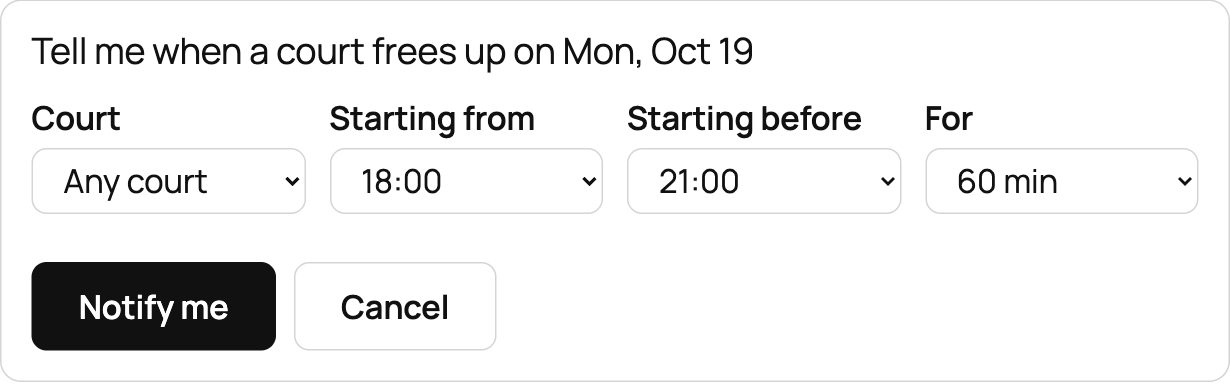
Under the free times, players can ask “Tell me when a court frees up”: any court or one court, the time range they could start in, and how long they want to play. If something matching is already free, they're told straight away. Otherwise, the moment a booking is cancelled, an online booking isn't paid in time, or staff remove a block, everyone waiting for a matching slot gets an email at the same time, and the first to book gets it.

Outcome

Late cancellations get refilled by players who actually want that court, without anyone at the desk making calls.

Notify meAlert
A player asking to be told when a court frees up
12:00Pricing engine

Money · Pricing engine

Charge what each booking is worth, and see why.

Before

Peak hours, weekends, members, guests, floodlights: most systems give you one price per hour and leave the desk to do the maths.

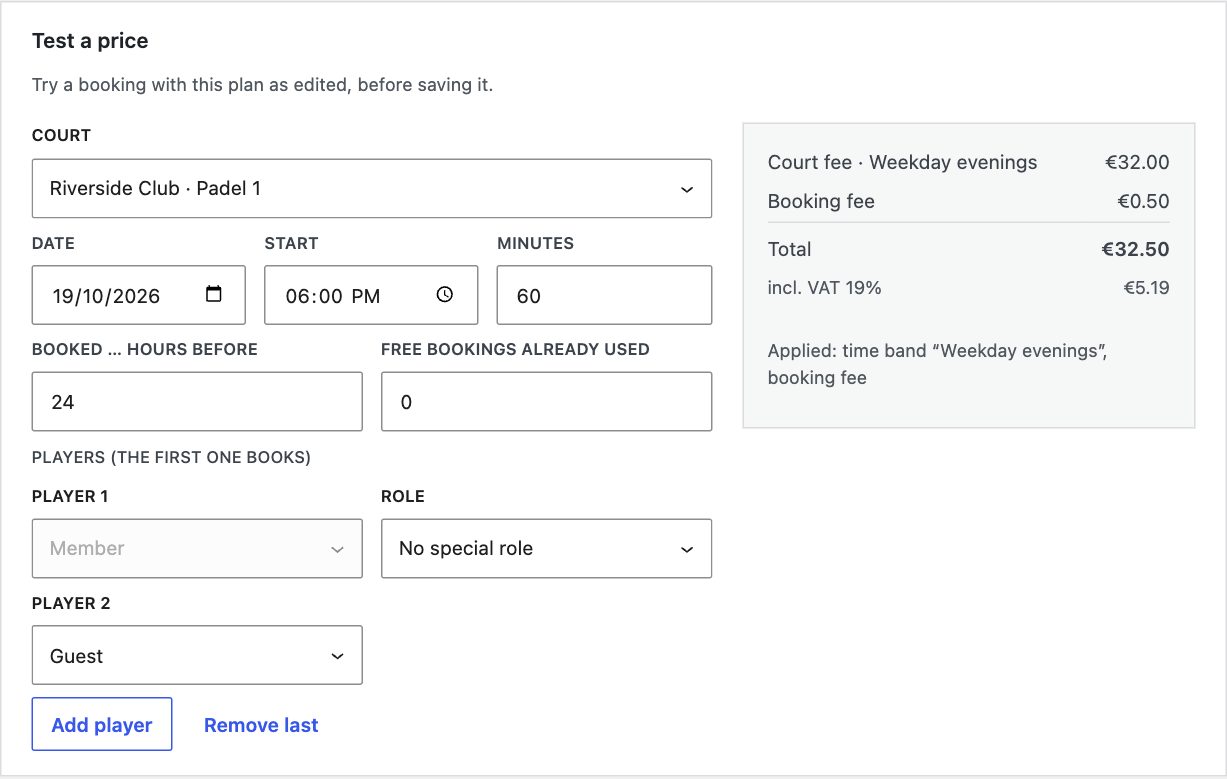
Build named price plans and choose where each one is used. Charge nothing, per court, or per player with separate fees for members, club-list players and guests. Add time bands for peak and off-peak hours and weekends, a lighting surcharge, member prices by role, early-booking and last-minute discounts, free bookings per week or month, and a booking fee. Prices include VAT.

  • 01Test a price: try any court, time and players before saving
  • 02Every line explained: which band, fee or discount applied
  • 03Used at: tick the locations and courts a plan applies to
  • 04Players see the price and their share before confirming
Example

Padel 1, Monday at 18:00: “Weekday evenings” court fee €32.00 plus a €0.50 booking fee, total €32.50 including €5.19 VAT.

Pricing → Test a pricePadel 1 · 18:00
The Test a price tool explaining a price line by line
13:00Payments

Money · Online payments

Get paid when they book, not when they turn up.

Before

Unpaid bookings turn into no-shows, and the desk spends its evenings chasing small amounts.

With WooCommerce active, turn on Pay online in your booking rules. Each booking gets its own order paid on WooCommerce's payment page, so any WooCommerce gateway works, including the one you already use. The court is held while the player pays (15 minutes by default, you choose). If they don't pay in time, the booking is cancelled and the court is free again. Cancel a paid booking and the refund goes back through the gateway, following your cancellation policy.

  • 01Phone booking? Email the player a payment link
  • 02Paid at the desk instead: Mark as paid closes the link
  • 03Late payment after the hold: refunded automatically
  • 04Gateway can't refund? It's flagged under Needs attention
  • 05Or keep it simple: pay at the venue
  • 06Refund levels by how late a player cancels
Outcome

Money arrives in your own payment account with the booking, and refunds happen without anyone logging in to the gateway.

Pay for orderWooCommerce
14:00Calendar

Front desk · Calendar

The whole day on one screen. Changes in one drag.

Before

“Can we move to court 3 at eight?” means a phone call, a crossed-out sheet, a message to the player, and hoping the price is right.

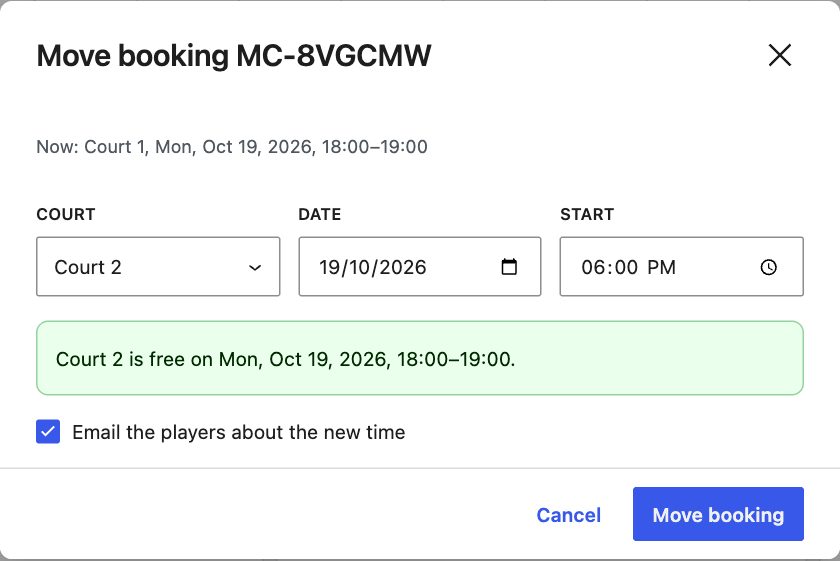
The staff calendar shows every court at a location for the day, coloured by status: paid, to pay at the venue, checked in, blocked. Book for a player (once or every week), mark paid, check in, record a no-show, or cancel with the refund you choose. To move a booking, drag it to another court or time. ManageCourt checks the new slot is free, lets you keep the price or use the new one, and emails the player the new time with an updated calendar file.

  • 01Block courts for coaching or maintenance, with a label players see
  • 02One-off or weekly blocks
  • 03Staff can book outside the rules; never over another booking
  • 04A cheaper move refunds the difference automatically
Outcome

Front-desk changes take seconds, and players always have the right time in their calendar.

Calendar · Riverside ClubMon 19 Oct
Move bookingCourt 2
Moving a booking to Court 2, keeping or changing the price
16:00Rain

Front desk · Weather closure

Rain at four? Handle it in one dialog.

Before

A storm means thirty phone calls, refunds one by one, and someone who still turns up because they never got the message.

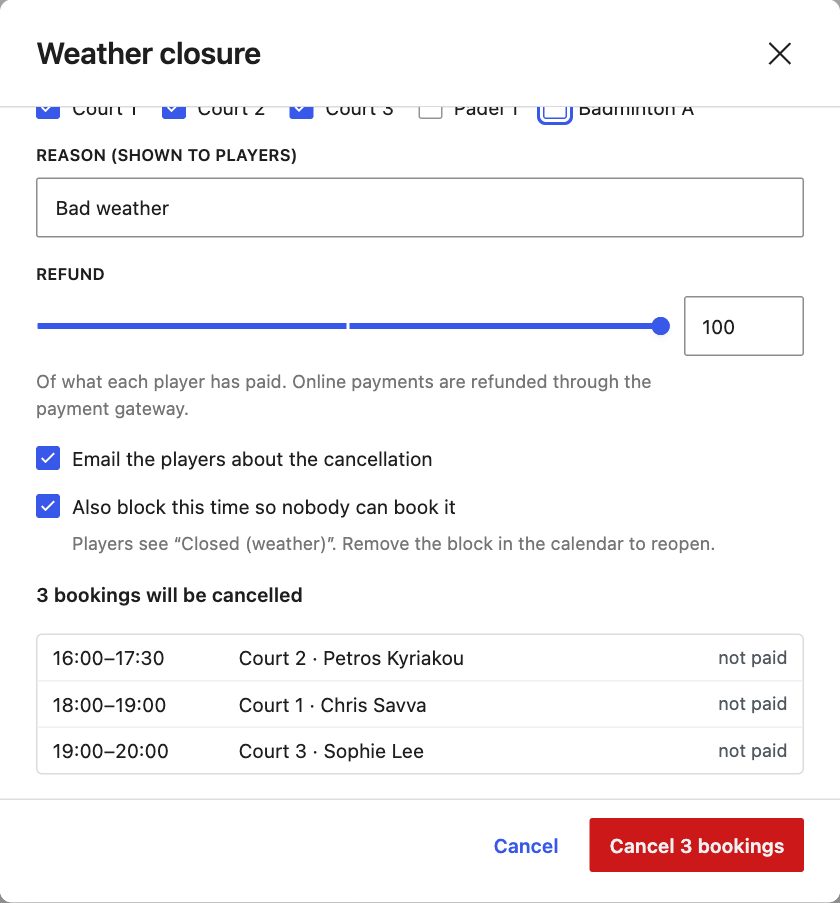
Open Weather closure, tick the courts and set the time range. You see exactly which bookings will be cancelled before you confirm. Choose the refund (a share of what each player paid, refunded through the gateway for online payments), write the reason players will read, and ManageCourt emails every player. Tick one box to block the time too, so players see “Closed (weather)” and nobody books into the storm.

Outcome

Every affected player is told and refunded within minutes, and your staff are free to deal with the people at the door.

Weather closure3 bookings
The weather closure dialog listing the bookings it will cancel
17:00Today and Reports

Front desk · Today and Reports

Know what today needs, and what this month earned.

Before

Who's playing next, who hasn't paid, which hours sit empty: usually that means three spreadsheets and a guess.

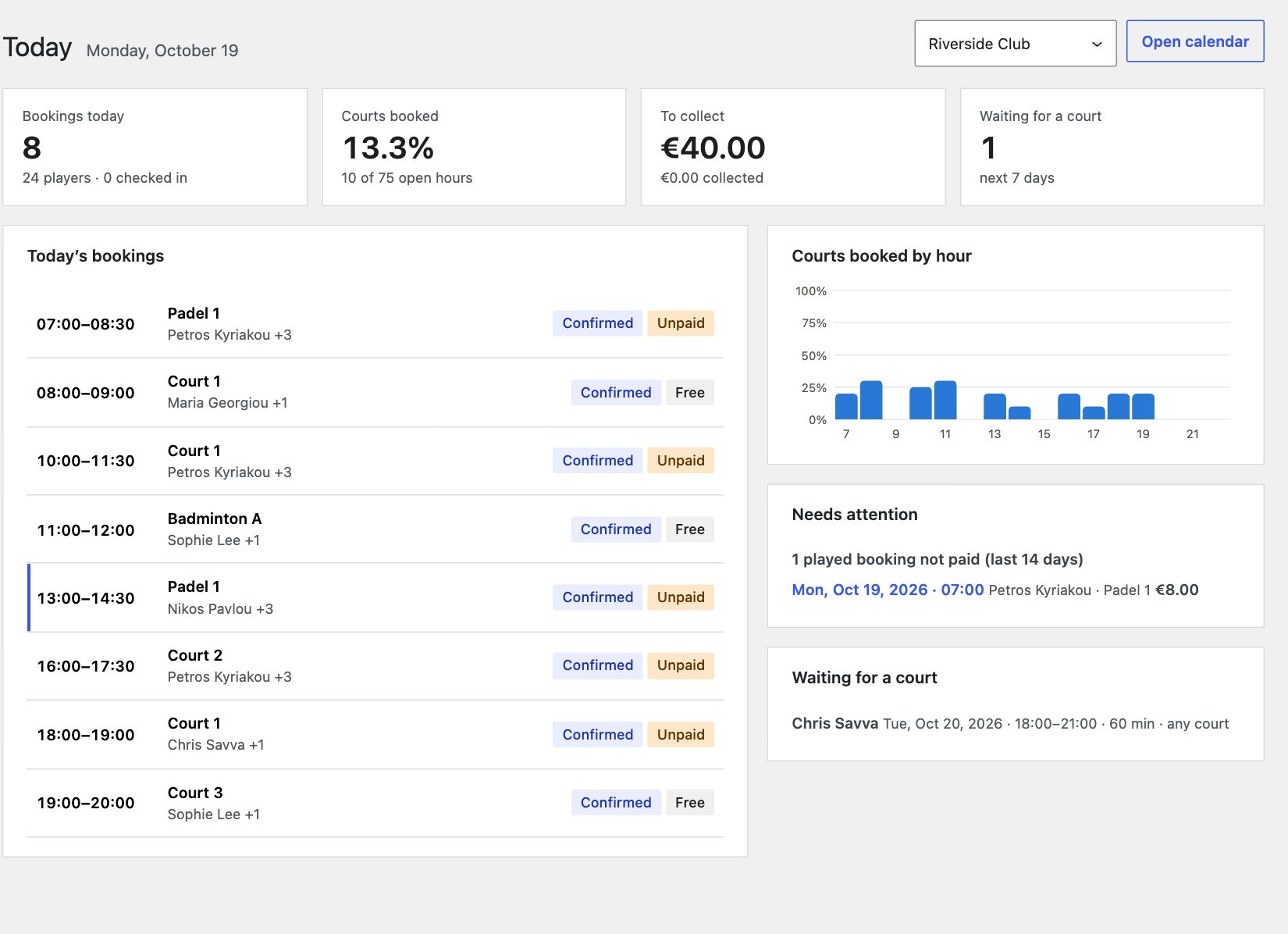
Today is the front desk's first screen: today's bookings, how many courts are booked, money still to collect, players waiting for a court, and anything that needs attention, such as a played booking that wasn't paid. Reports cover any period and location: courts booked by day and by hour, booked value next to money actually collected, cancellations and no-shows, busiest times, most active players, and each court's share.

  • 01“Courts booked” counts only open, bookable hours
  • 02Booked versus collected, so unpaid money is never hidden
  • 03Busiest times by weekday and hour
  • 04Export every booking to CSV; it opens cleanly in Excel
Outcome

You can see your quiet hours and act on them, with off-peak prices or coaching blocks, instead of guessing.

TodayMon 19 Oct
The Today dashboard
Reports · Busiest times30 days
18:00Players

Your club · Players

Your members and your club list, in one place.

Before

The member list lives in a spreadsheet, half the players have no account, and nobody is sure who agreed to be searchable.

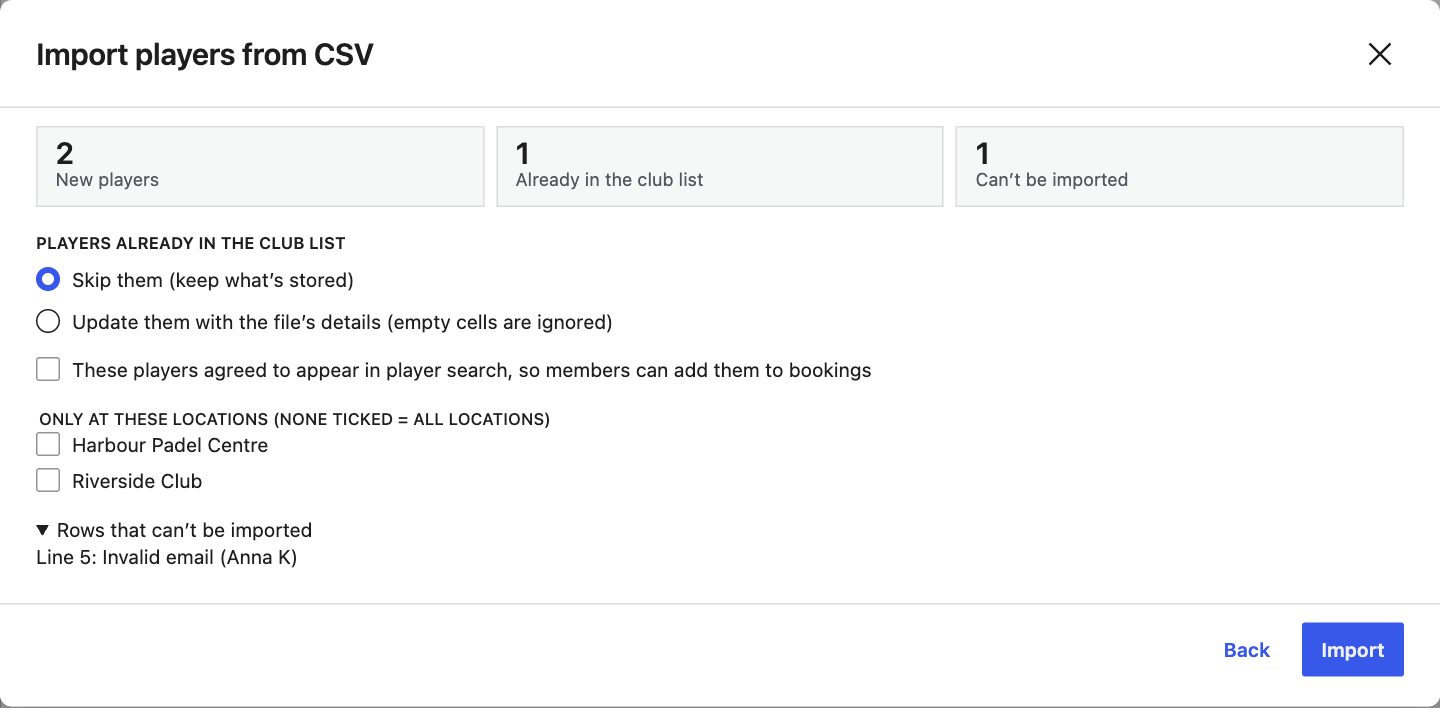
The Players screen lists members with accounts and your own club list together. Each profile shows booking history, upcoming bookings, no-shows and staff notes. Import your spreadsheet with CSV import: files from Excel work, Greek ones included, with Greek column names recognised. You see what's new, what's already there and what can't be imported before anything changes. Then invite club-list players to create an account, and their booking history comes with them.

  • 01Players search for partners only among people who agreed
  • 02Each person chooses; you set defaults, after confirming consent
  • 03Invitation links work once and expire after 7 days
  • 04Export the list whenever you need it
Outcome

Your whole membership is ready to book on day one, and privacy is handled the way GDPR expects.

Players → Import CSVReview
Reviewing a CSV import: new, existing and invalid rows
18:30Emails

Your club · Emails and languages

Every player hears from you in their own language.

Before

Your members don't all read the same language, and generic emails from a booking platform end up in spam.

ManageCourt sends the confirmation, cancellation, reminder and moved-booking emails, plus payment links and invitations, from your club, in each recipient's own WordPress language when your site has that translation. Every booking email carries a details table and a calendar file that adds it to the player's phone; a cancellation removes it. Edit any template with placeholders, preview it with a real booking, and send yourself a test.

  • 01Reminders 2 to 48 hours before the start, or off
  • 02Copies to the club when you want them
  • 03Works with WPML and Polylang for multilingual sites
  • 04Every text in the plugin can be translated
Outcome

Fewer “what time was it again?” calls, and emails that look like they came from your club, because they did.

Booking confirmationEmail
19:00Locations and staff

Your club · Locations and staff

One club or several, with the right access for each person.

Before

Your front desk needs the calendar, not the keys to your whole website. And your second venue has different hours.

Add as many locations as you run, each with its courts, opening hours, amenities and contact details, and its own page. Booking rules are set once and inherited: global, then location, then court. Set game lengths, start times, how far ahead players can book, minimum notice, and limits per player and per role. Give front-desk staff the Court Manager role and, if you like, limit each one to specific locations.

  • 01Court Managers run Today, Reports, the calendar and Players; only admins change prices and settings
  • 02Limited managers see only their locations, reports included
  • 03Override any rule on a single court
  • 04Any court sport, with editable formats such as singles and doubles
Outcome

Each venue runs its own day, and you still see the whole club in Reports.

Users → Edit userCourt Manager
Limiting a Court Manager to specific locations
19:30Your data

Your club · Your data

Your website. Your players. Your money.

Before

Booking platforms keep a share of each booking and own the relationship with your players.

With ManageCourt, bookings live in your own WordPress database and online payments go straight to your own payment account. There is no commission and no fee per court: just a fixed licence fee. Personal data can be exported or erased with WordPress's privacy tools, bookings keep your records with names removed, and suggested privacy-policy text is included. Deactivating or deleting the plugin deletes nothing unless you choose to.

Outcome

As you grow, your costs don't, and your player list stays an asset of your club.

Settings → Privacy & dataConsent
20:00Why ManageCourt

Why ManageCourt

The booking system that works for your club, not the other way round.

No commissionBooked
0%

No commission, ever

A fixed licence fee from €9.99 a month, however many bookings you take and courts you open. Online payments go to your account.

Your brand
Yours

Your brand and your data

Players book on your website, in your colours, and get emails from your club. Their details stay on your server.

Compared with booking apps

Apps are quick to start, but you pay per booking or per court, players book in someone else's brand, and the player relationship sits with the platform. ManageCourt gives you the same convenience on your own site.

Compared with general booking plugins

Appointment plugins are made for one person and one time slot. ManageCourt understands courts: several players per booking, per-player prices, sports and surfaces, front-desk tools and rain.

20:30Pricing

Pricing

One plan, everything included.

€9.99 a month, €95.99 a year or €299.99 once, excl. VAT. Try it on your own site first. Pricing details →

21:00Questions

FAQ

Questions clubs ask us.

All questions and answers →

Do I need WooCommerce?

Only for online payments. Without it, players book and pay at the venue. With WooCommerce, each booking gets its own order and any WooCommerce payment gateway works.

Can players book without an account?

Anyone can see what's free. To book, players log in or create an account on your site, so bookings, limits and cancellations belong to a person. Their partners can be other members, people on your club list or guests added by name.

What happens if I stop paying?

If your licence lapses, ManageCourt pauses until you renew: the admin shows only the licence screen, and booking pages tell players that online booking isn't available at the moment. Nothing is deleted. Renew under ManageCourt → Account and everything works again, exactly as you left it. Monthly and annual licences renew automatically; a lifetime licence never expires.

Is it GDPR-friendly?

Yes. Players appear in the partner search only with consent. Personal data can be exported and erased with WordPress's privacy tools, and suggested privacy-policy text is added for you.

Which sports does it support?

Any court sport: tennis, padel, badminton, pickleball, squash and more. You can edit sports and their formats, such as singles and doubles.

Will it match our website?

Yes. The booking pages use your theme's fonts and colours automatically, in block themes and classic themes.

Do you take a share of our bookings?

No. You pay a fixed licence fee: monthly, yearly or once for life. Online payments go through your own WooCommerce gateway, straight to your account.

We build websites for clubs. Can we use it?

Yes. ManageCourt is a standard WordPress plugin with a full user guide. Buy one licence per club site; it can be moved from a staging site to the live one.

21:30Last call
Your courts · this weekBooked

Open your courts for online booking this week.

Three days, free, on your own site. No card needed.